AI Flowchart Generator: Turn Text Into a Diagram Instantly (PNG and SVG)
Convert text into a clean flowchart instantly using an AI flowchart generator. Create diagrams from plain English and export as PNG or SVG for reports and presentations.

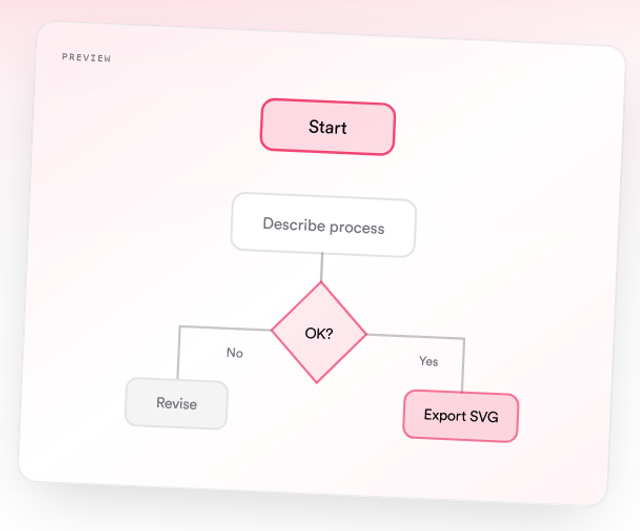
Creating flowcharts used to be frustrating.
You open Word or another tool, start adding shapes, connect arrows, adjust alignment, and after a while, the diagram still looks messy.
Now there is a faster way.
With an AI flowchart generator, you can turn a simple paragraph into a clean diagram in seconds.
Quick Summary
- An AI flowchart generator converts plain English into a structured diagram
- You can create flowcharts without dragging shapes or designing manually
- Export options like PNG and SVG make it easy to use in reports and presentations
- This is useful for SIWES reports, final year projects, and assignments
- Tools like Diagflow allow you to generate diagrams instantly from your text
What Is an AI Flowchart Generator?
An AI flowchart generator is a tool that creates diagrams automatically from your description.
Instead of drawing shapes manually, you simply describe your process.
Example:
A user logs in, the system checks credentials, and if valid, the dashboard opens. If invalid, an error message is shown.
The tool converts this into a complete flowchart with:
- Proper structure
- Clear flow direction
- Connected steps
Why Students and Professionals Use It
Many students and professionals prefer this approach because it is:
- Faster than manual drawing
- Easier to use
- More accurate
- Cleaner in appearance
It is especially useful for:
- SIWES reports
- Final year projects
- Assignments
- Presentations
- Technical documentation
How It Works
Using an AI flowchart generator is simple.
Step 1: Describe Your Process
Write your steps in plain English.
Example:
A customer places an order. The system processes the order and checks payment. If payment is successful, the order is confirmed. If not, the customer is notified.
Step 2: Generate the Diagram
Paste your text into the tool and generate your flowchart.
The system automatically:
- Identifies steps
- Adds decision points
- Connects everything logically
Step 3: Export Your Diagram
You can download your diagram as:
- PNG for Word documents and slides
- SVG for high quality and editing
Step 4: Use It Anywhere
Insert your diagram into:
- Microsoft Word
- Google Docs
- Notion
- PowerPoint or slides
Example: Text to Flowchart
Input:
A student receives a task, completes it, and submits it for review. If corrections are needed, the student revises and resubmits. If approved, the task is completed.
Output:
A clean flowchart showing:
- Start
- Task execution
- Decision point
- Revision loop
- Final completion
Why This Is Better Than Drawing Manually
Manual Method
- Time consuming
- Difficult to align shapes
- Often looks unprofessional
- Hard to edit
AI Method
- Instant generation
- Clean layout
- Easy to modify
- Export ready
This saves hours, especially when you are working on deadlines.
PNG vs SVG: Which Should You Use?
- Use PNG if you are inserting the diagram into Word or slides
- Use SVG if you need high quality scaling or want to edit the diagram later
Both formats are useful depending on your use case.
When to Use an AI Flowchart Generator
You should use it when:
- Explaining a process in your SIWES report
- Creating diagrams for Chapter 3 in your project
- Designing system workflows
- Preparing presentation slides
- Documenting technical processes
Using Diagflow to Generate Flowcharts
One tool that makes this process simple is Diagflow by MonoEd.
With it, you can:
- Describe your process once
- Generate a clean flowchart instantly
- Export in PNG or SVG
- Paste directly into your report or slides
You do not need design skills or diagram experience.
Sample Prompt You Can Try
You can copy and use this:
A user signs up on a platform. The system validates the input. If valid, the account is created and the user is redirected to the dashboard. If invalid, an error message is shown.
Tips for Better Results
- Keep your description clear and structured
- Break processes into simple steps
- Include decision points where needed
- Avoid overly long sentences
Common Mistakes to Avoid
- Writing unclear or vague descriptions
- Adding too many steps at once
- Ignoring decision points
- Trying to manually fix everything instead of regenerating
Conclusion
Creating flowcharts no longer needs to be stressful or time consuming.
With an AI flowchart generator, you can:
- Turn your ideas into diagrams instantly
- Save time
- Improve the quality of your work
If you regularly create reports, projects, or presentations, this approach can make a big difference.
FAQs
1. What is the best AI flowchart generator?
There are several tools available, but you should choose one that is simple, fast, and allows export in PNG and SVG formats.
2. Can I create a flowchart from text automatically?
Yes. AI flowchart generators allow you to convert plain English into a structured diagram instantly.
3. Is this useful for students?
Yes. It is especially useful for SIWES reports, final year projects, and assignments.
4. Do I need design skills to use it?
No. You only need to describe your process clearly.
5. What format should I use for my report?
PNG is best for Word documents and presentations, while SVG is better for high quality and editing.
6. Can I edit the diagram after generating it?
Yes. Many tools allow you to regenerate or edit your diagram if needed.
About the Author
Mohammad-Jamiu B. Balogun, GMNSE
AI Security Researcher · Founder, MonoEd Africa
Mohammad-Jamiu is a First-Class Telecommunications Engineer and Best Graduating Student (BUK), and an AI security researcher. He founded MonoEd Africa to give Nigerian students AI-powered academic tools — from SIWES logbooks to final year projects. His work has reached over 10,000 students across Nigeria.