How to Format and Submit a Research Paper to a Journal: Complete Guide for First Time Authors
Learn how to format and submit a research paper to a journal correctly. Covers manuscript formatting, Microsoft Word setup, abstracts, references, figures, cover letters, and common submission mistakes.

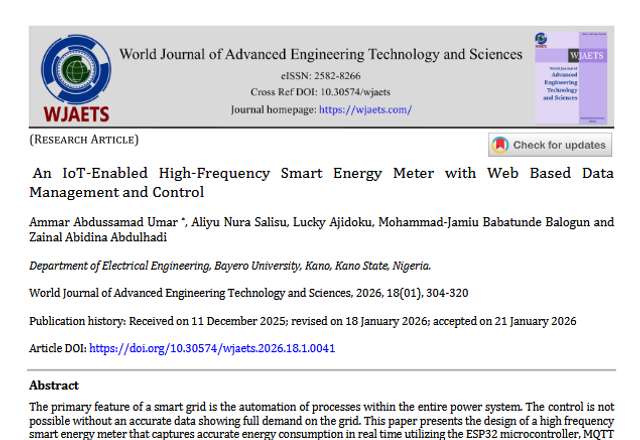
Writing a research paper is difficult enough. Formatting and submitting it to a journal can feel even more confusing, especially for first time authors.
Many researchers assume the process is simple until they open the journal guidelines and discover dozens of formatting rules, submission requirements, declaration forms, and reference instructions.
Questions quickly begin to appear:
Should the abstract start on a new page?
Should section headings be bold?
Do figures go inside the manuscript or separately?
How should references be formatted?
What if the journal asks for line numbering?
These are common problems for students, lecturers, researchers, and first time academic authors.
The good news is that most journals follow a broadly similar structure. Once you understand the workflow, formatting and submission become much easier.
This guide explains how to format and submit a research paper step by step using practical examples and common journal requirements.
Quick Summary
To format and submit a research paper successfully:
- read the journal author guidelines first
- use the required page size, font, and spacing
- structure sections correctly
- format references properly
- insert figures and tables clearly
- prepare all submission documents
- double check author information before submission
Most journals reject or delay papers because of formatting and submission errors, not only because of research quality.
Step 1: Read the Journal Guidelines Carefully
Before formatting anything, visit the journal website and read the “Instructions for Authors” or “Submission Guidelines” section carefully.
Every journal has its own requirements.
Common things journals specify include:
- article length
- font style
- line spacing
- page size
- abstract word count
- reference style
- figure resolution
- accepted file formats
For example, one journal may require:
- Times New Roman
- 12 pt font
- double spacing
- A4 paper size
- DOCX submission
Another journal may require completely different settings.
Always follow the journal instructions first.
Step 2: Set Up the Manuscript Properly
Most journals use similar formatting standards.
Typical manuscript settings include:
- A4 paper size
- 1 inch margins
- Times New Roman 12 pt
- double spacing
- justified text alignment
- automatic page numbering
How to Set Up in Microsoft Word
In Microsoft Word:
Layout → Size → A4
Layout → Margins → Normal
Home → Line and Paragraph Spacing → 2.0
Insert → Page Number
For line numbering:
Layout → Line Numbers → Continuous
Some journals require continuous line numbering during peer review.
How to Set Up in Google Docs
In Google Docs:
File → Page setup → A4
Format → Line spacing → Double
Insert → Page numbers
Always confirm the exact formatting instructions provided by the journal before submission.
Step 3: Format the Title Page
The title page is usually the first page of the manuscript.
It often contains:
- paper title
- author names
- affiliations
- email addresses
- corresponding author information
Example:
Machine Learning Based Traffic Prediction System for Smart Cities
Mohammad Jamiu¹, Mary Smith²
¹ Department of Computer Science, University of Lagos, Nigeria
² Department of Electrical Engineering, Ahmadu Bello University, Nigeria
Corresponding Author:
Mohammad Jamiu
Email: mohammadj@email.com
Some journals prefer centered alignment while others prefer left alignment.
Always check the journal style.
Step 4: Put Abstract and Keywords Correctly
Many journals place the abstract on a separate page immediately after the title page.
A common structure is:
- Page 1: Title Page
- Page 2: Abstract and Keywords
- Page 3 onward: Main manuscript
Example:
Abstract
This study investigates the use of machine learning techniques for predicting traffic congestion in urban smart city environments.
....... (Abstract is usually 250 words)
Keywords: Machine Learning; Smart Cities; Traffic Prediction; Artificial Intelligence
Avoid adding citations inside the abstract unless specifically requested.
Step 5: Structure the Main Sections Properly
Most research papers follow a standard structure.
Typical sections include:
- Introduction
- Materials and Methods
- Results
- Discussion
- Conclusion
- References
Some papers combine Results and Discussion into one section.
Headings are usually:
- bold
- left aligned
- consistently numbered if required
Do not start every section on a new page unless instructed by the journal.
Example Structures Across Different Fields
Different disciplines may structure papers slightly differently.
Engineering and Computer Science
Often include:
- Introduction
- System Design
- Methodology
- Results and Discussion
- Conclusion
Example topics:
- AI generated code analysis ....
- IoT systems ....
- blockchain applications ....
Medical and Health Sciences
Often follow the IMRAD structure:
- Introduction
- Methods
- Results
- Discussion
Example topics:
- disease prevalence studies
- patient monitoring systems
- clinical evaluations
Social Sciences and Education
May include:
- Background of the Study
- Literature Review
- Research Methodology
- Findings
- Conclusion
Always follow the structure preferred by the target journal.
Step 6: Use Subheadings Clearly
Subheadings improve readability and organization.
Example:
2.1 Dataset Collection
2.2 Experimental Setup
2.3 Evaluation Metrics
Keep numbering consistent throughout the paper.
Step 7: Format Figures and Tables Properly
Figures and tables should appear near the related discussion inside the manuscript.
Tables
Table titles usually appear above the table.
Example:
Table 1. Accuracy comparison across models
Figures
Figure captions usually appear below the figure.
Example:
Figure 1. Proposed system architecture
Ensure:
- images are clear
- screenshots are readable
- figures are properly labeled
- sensitive information is removed
Low quality figures are a common reason journals request revisions.
Step 8: Format Equations, Code, and Commands Properly
Technical papers often include equations, code snippets, or terminal commands.
Separate them clearly from regular text.
Example:
python train_model.py --epochs 100
Use monospace formatting for commands and code.
Mathematical equations should also remain properly aligned and readable.
Step 9: Understand Reference Style Requirements
Different journals require different citation styles.
Common styles include:
- APA
- IEEE
- Harvard
- Vancouver
- MLA
APA Example
(Balogun & Sani, 2026)
IEEE Example
[1]
Using the wrong reference style can delay review or cause rejection.
Always use the exact style requested by the journal.
Step 10: Prepare All Submission Documents
Many first time authors focus only on the manuscript and forget additional required files.
Journals may request:
- manuscript file
- cover letter
- author declaration
- supplementary files
- figure files
- copyright forms
Before submission, double check that all required files are included.
Typical Journal Submission Workflow
A standard journal submission process usually follows these steps:
- Select a journal
- Read author guidelines
- Format the manuscript
- Prepare figures and tables
- Write cover letter
- Submit files
- Receive manuscript ID
- Wait for peer review
- Submit revisions if requested
- Receive acceptance or rejection decision
Understanding the workflow early helps reduce confusion during submission.
Common Journal Submission Mistakes
Many papers face delays because of avoidable mistakes such as:
- wrong formatting
- missing line numbering
- incorrect references
- low quality figures
- missing author information
- incomplete declarations
- submitting PDF instead of DOCX
- inconsistent headings
Careful proofreading before submission can prevent many of these problems.
Final Pre Submission Checklist
Before submitting your manuscript, confirm that:
✓ manuscript formatting matches journal guidelines
✓ all authors approved the final version
✓ references are consistent
✓ figures and tables are labeled properly
✓ abstract meets word limit
✓ keywords are included
✓ cover letter is attached
✓ declarations are completed
✓ page numbering exists
✓ line numbering exists if required
Formatting and submitting a research paper becomes much easier once you understand the standard workflow. Most first time authors struggle because journals assume certain formatting knowledge that is not always explained clearly.
The good news is that after completing your first journal submission, future submissions usually become far easier and faster.
FAQs
Should the abstract start on a new page?
Many journals place the abstract and keywords on a separate page after the title page.
Should section headings be bold?
In most journals, major section headings are bold and left aligned.
Should figures be placed inside the manuscript?
Many journals now prefer figures inserted near the relevant discussion inside the manuscript.
Do all journals use the same format?
No. Formatting requirements vary between journals, so always follow the target journal guidelines.
What font do journals usually require?
Many journals use Times New Roman 12 pt, but requirements vary.
Should I submit DOCX or PDF?
Many journals request DOCX or Word files for peer review and editing purposes.
What is line numbering in manuscripts?
Line numbering adds numbers beside each line of text to help reviewers reference corrections during peer review.
Can I use Google Docs for manuscript writing?
Yes. Many authors draft manuscripts in Google Docs before exporting to Microsoft Word format for submission.
What is a corresponding author?
The corresponding author handles communication with the journal during submission, peer review, and publication.
What happens after manuscript submission?
After submission, the journal reviews the manuscript, assigns reviewers, and later sends an acceptance, rejection, or revision decision.
About the Author
Mohammad-Jamiu B. Balogun, GMNSE
AI Security Researcher · Founder, MonoEd Africa
Mohammad-Jamiu is a First-Class Telecommunications Engineer and Best Graduating Student (BUK), and an AI security researcher. He founded MonoEd Africa to give Nigerian students AI-powered academic tools — from SIWES logbooks to final year projects. His work has reached over 10,000 students across Nigeria.