How to Draw an Organogram for Your SIWES Report (With Examples in Nigeria)
Learn how to draw a clear organogram for your SIWES report in Nigeria. Step by step guide with real company structure examples and simple tools to create clean diagrams.

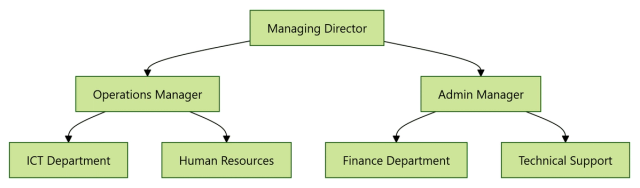
If you are writing your SIWES report, one section you cannot ignore in Chapter Two is:
The organizational structure or organogram.
Many students struggle with this part because:
- They are not sure what it should look like
- They try to draw it in Word and get stuck
- Or they copy something that does not match their company
This guide will show you exactly how to create a clean and correct organogram for your SIWES report using simple steps and real examples.
Quick Answer
- An organogram is a diagram showing a company’s structure and reporting hierarchy
- It is placed in Chapter Two (Organizational Profile), usually under Section 2.3
- It should show roles and departments, not individual names
- Use a simple top-to-bottom structure
- For best results, create it using a diagram tool (DiagFlow) instead of manually drawing in Word
What Is an Organogram?
An organogram is a diagram that shows the structure of an organization.
It explains:
- Who is in charge
- How departments are arranged
- The reporting hierarchy
In simple terms, it answers this question:
Who reports to who in the company?
Where the Organogram Goes in Your SIWES Report
The organogram is included in:
Chapter Two: Organizational Profile
Specifically under:
2.3 Organizational Structure
It usually comes after:
- Company background
- Mission and vision
Example caption:
Figure 2.1: Organizational Structure of the Company
Why Your SIWES Organogram Matters
A well presented organogram helps you:
- Show you understand the company structure
- Make your report look professional
- Score higher marks
- Improve clarity for your supervisor
Even if it is simple, it must be clear and accurate.
Basic Structure of an Organogram
Most SIWES placements follow a simple hierarchy.
Example:
Managing Director
↓
Operations Manager
↓
Departments:
- ICT Unit
- Human Resources
- Finance
- Technical Support
Each level flows from top to bottom.
Example of a SIWES Organogram
Let us look at a simple company structure.
Top Level:
- Managing Director
Middle Level:
- Operations Manager
- Admin Manager
Lower Level:
- ICT Department
- HR Department
- Accounts Department
- Support Team
This is the kind of structure you should represent in your diagram.
Step by Step: How to Draw Your SIWES Organogram
Step 1: Identify Key Positions
List the roles in your organization.
Example:
- Managing Director
- Manager
- Supervisor
- Staff
Do not include every single employee. Focus on structure.
Step 2: Group by Levels
Arrange them from highest to lowest:
Top:
- Managing Director
Middle:
- Managers
Bottom:
- Departments or staff units
Step 3: Define Reporting Lines
Ask:
- Who reports to who
Draw connections accordingly.
Step 4: Create the Diagram
Each role becomes a box.
Lines connect them vertically.
Keep it simple and clean.
Step 5: Use a Tool for Better Results
Instead of drawing manually in Word, you can use a tool like Diagflow by MonoEd.
You simply:
- Describe the structure
- Generate the diagram
- Download as PNG or SVG
- Insert into your report
This gives you a neat and professional result quickly.
Step 6: Insert Into Your Report
- Place it under Section 2.3
- Add a proper caption
Example:
Figure 2.2: Organizational Structure of XYZ Company
Sample Prompt You Can Copy
You can use this format:
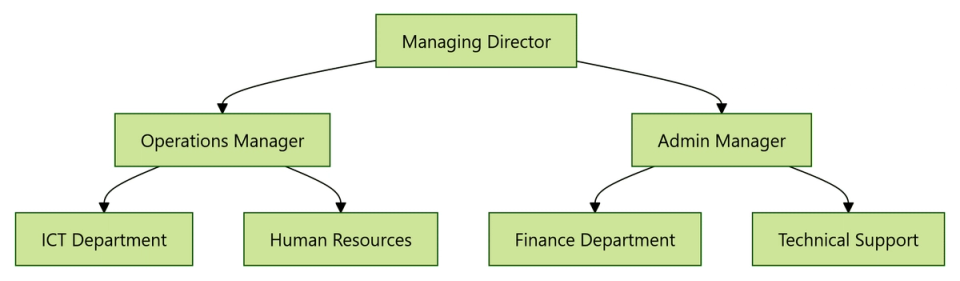
A company has a Managing Director at the top. Under the Managing Director are Operations Manager and Admin Manager. Under them are departments including ICT, Human Resources, Finance, and Technical Support.
Paste this into your diagram tool and generate your organogram.
You should get an output like this:
Common Mistakes to Avoid
Avoid these errors:
- Making the diagram too complex
- Including too many names instead of roles
- Using unclear hierarchy
- Drawing scattered shapes
- Copying a generic organogram that does not match your company
Tips for a Clean Organogram
- Use job titles, not personal names
- Keep it simple and readable
- Maintain a clear top to bottom flow
- Align boxes properly
- Use consistent spacing
Manual vs Smart Method
Manual Method
- Difficult to align shapes
- Time consuming
- Often looks unprofessional
Smart Method
- Fast
- Clean structure
- Easy to edit
- Ready for export
Using a smart tool like Diagflow helps you avoid formatting issues and saves time.
Conclusion
Your SIWES organogram is a small section, but it plays an important role in your report.
A clear and simple structure shows that you understand how the organization works.
Instead of struggling with shapes and formatting, focus on:
- Identifying the structure
- Presenting it clearly
- Keeping it professional
That alone can improve the overall quality of your SIWES report.
FAQs
1. Is an organogram compulsory in SIWES reports?
In most Nigerian institutions, yes. It is a key part of Chapter Two.
2. What should be included in a SIWES organogram?
Only the structure of the organization, including major roles and departments.
3. Can I include names in my organogram?
It is better to use job titles instead of names.
4. How many levels should an organogram have?
There is no fixed number, but most have 3 to 5 levels.
5. Can I draw my organogram in Word?
Yes, but it can be difficult to align properly. Using a diagram tool is easier.
6. Can I reuse the organogram for presentations?
Yes. You can include it in your SIWES defense slides.
About the Author
Mohammad-Jamiu B. Balogun, GMNSE
AI Security Researcher · Founder, MonoEd Africa
Mohammad-Jamiu is a First-Class Telecommunications Engineer and Best Graduating Student (BUK), and an AI security researcher. He founded MonoEd Africa to give Nigerian students AI-powered academic tools — from SIWES logbooks to final year projects. His work has reached over 10,000 students across Nigeria.