Best Free Diagram Tools for Students in Nigeria (Flowcharts, ER Diagrams and More)
Discover the best free diagram tools for students in Nigeria. Compare flowchart, ER diagram, and AI diagram generators for projects, SIWES, and assignments.

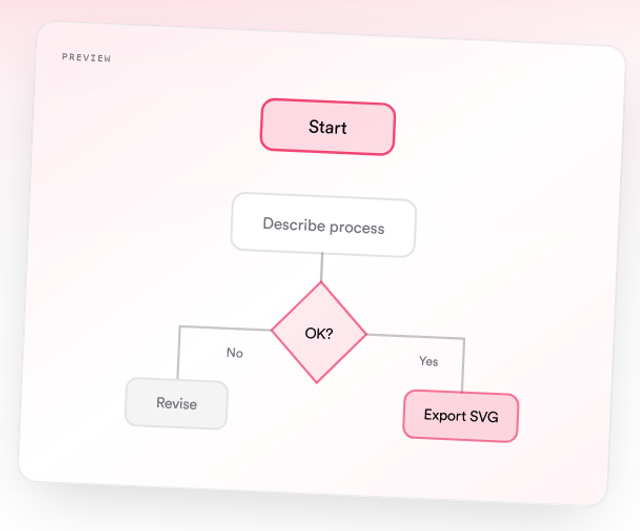
If you are a student in Nigeria working on a SIWES report, final year project, or assignment, you will likely need to create diagrams.
This includes:
- Flowcharts
- ER diagrams
- System design diagrams
- Organograms
The problem is not finding tools. The problem is finding the right one.
Some tools are free but stressful to use. Others are easy but limited.
This guide breaks down the best free diagram tools for students and helps you choose the right one based on your needs.
Quick Summary
- There are many free diagram tools, but they differ in ease of use and features
- Manual tools like draw.io give full control but take more time
- Visual tools like Canva are good for presentations but not technical diagrams
- Quick sketch tools like Excalidraw are useful for rough work
- AI tools like Diagflow let you create diagrams instantly from text
- The best tool depends on whether you want speed, control, or design
What to Look for in a Diagram Tool
Before choosing a tool, consider:
- Ease of use
- Diagram types supported
- Export options
- Compatibility with Word or Google Docs
- Speed of creation
For most students, speed and simplicity matter the most.
1. Diagflow by MonoEd (Best for Speed and Simplicity)
Diagflow is built for students who want to create diagrams quickly without manual design.
Instead of dragging shapes, you describe your process in plain English and the tool generates the diagram.
Why it stands out
- Converts text into diagrams instantly
- Supports flowcharts, ER diagrams, sequence diagrams, and more
- Exports in PNG and SVG
- Works with Word, Google Docs, Notion, and slides
Best for
- SIWES reports
- Final year projects
- Assignments with tight deadlines
Example use
You can type:
A user logs in, the system checks credentials, and if valid, the dashboard opens
And get a clean flowchart immediately.
This approach saves time and removes the stress of manual drawing.
2. draw.io (diagrams.net) (Best for Full Control)
draw.io is one of the most popular free diagram tools.
It gives you full control over how your diagram looks.
Why students use it
- Completely free with no paywall
- Supports many diagram types
- Integrates with Google Drive and OneDrive
- Can be used offline
Limitations
- Requires manual drag and drop
- Can be time consuming
- Alignment can be difficult for beginners
Best for
- Students who want detailed control
- Complex diagrams
- Advanced users
3. Canva (Free Plan) (Best for Visual Design)
Canva is widely used for presentations and design work.
Why students like it
- Ready made templates
- Easy to use interface
- Clean and attractive visuals
Education benefit
Some Nigerian students can access Canva for Education, which unlocks more features.
Limitations
- Not ideal for technical diagrams like ER or system design
- Less structured for process diagrams
Best for
- Presentations
- Infographics
- Simple diagrams
4. Excalidraw (Best for Quick Sketches)
Excalidraw is a simple tool for fast, hand drawn style diagrams.
Why students like it
- No login required
- Very fast and lightweight
- Works well on slow internet
Limitations
- Not suitable for polished diagrams
- Limited export quality
Best for
- Rough drafts
- Brainstorming
- Quick explanations
Manual Tools vs AI Tools
Manual Tools
Examples:
- draw.io
- Canva
Pros:
- Full control
- Flexible design
Cons:
- Time consuming
- Requires effort
- Can be frustrating
AI Tools
Example:
- Diagflow
Pros:
- Fast
- Easy to use
- No design skills needed
Cons:
- Less manual customization
Which Tool Should You Choose?
If you want:
- Speed and simplicity → Use Diagflow
- Full design control → Use draw.io
- Presentation quality → Use Canva
- Quick sketches → Use Excalidraw
For most students working on deadlines, speed matters more than control.
Why Many Students Are Switching to AI Tools
Students are moving away from manual tools because:
- Assignments have deadlines
- Reports require multiple diagrams
- Manual drawing takes too long
AI tools solve this by turning your ideas into diagrams instantly.
Using Diagflow for Your Diagrams
With Diagflow, you can:
- Describe your idea once
- Generate a diagram in seconds
- Export and insert into your report
This works especially well for:
- SIWES Chapter 3 flowcharts
- Final year project diagrams
- Presentation slides
Conclusion
There is no single best diagram tool for everyone.
The right choice depends on what you need.
If you want control, use manual tools.
If you want speed and simplicity, use AI tools.
For most Nigerian students working on SIWES and final year projects, using a faster method can save time and improve the quality of your work.
FAQs
1. What is the best free diagram tool for students in Nigeria?
It depends on your needs. For speed and ease, AI tools are often the best option. For full control, manual tools work better.
2. Is draw.io completely free?
Yes, it is free to use without hidden charges.
3. Can I use Canva for technical diagrams?
You can, but it is better suited for visual designs and presentations.
4. Which tool is best for SIWES reports?
Flowcharts are common in SIWES reports, so a tool that can generate them quickly is ideal.
5. Do I need internet to use these tools?
Some tools like draw.io offer offline versions, while others require internet access.
6. Can I export diagrams to Word or Google Docs?
Yes. Most tools allow you to export diagrams as images that can be inserted into documents.
About the Author
Mohammad-Jamiu B. Balogun, GMNSE
AI Security Researcher · Founder, MonoEd Africa
Mohammad-Jamiu is a First-Class Telecommunications Engineer and Best Graduating Student (BUK), and an AI security researcher. He founded MonoEd Africa to give Nigerian students AI-powered academic tools — from SIWES logbooks to final year projects. His work has reached over 10,000 students across Nigeria.