Best SIWES Logbook Generator Tools for Students (Free & Online)
Discover the best and only SIWES Logbook Generator tool for students in Nigeria — the MonoEd SIWES Logbook. Create weekly log entries automatically, add diagrams, and download your report in minutes. Free sign-up with 3 free credits.

If you’ve ever found yourself filling your SIWES logbook at the last minute, you’re not alone. Thousands of Nigerian students struggle to document their daily activities during industrial training (IT). It can be stressful, confusing, and time-consuming — especially when you’re unsure what to write each week.
Thankfully, there’s now a simple solution that changes everything:
👉 SIWES Logbook Generator by MonoEd — Nigeria’s #1 online SIWES logbook tool.
⚡ SIWES Tools for Students 🔥
Stop struggling with your SIWES documents — use our free AI-powered generators:
📘 SIWES Logbook Generator – Instantly create weekly logbook entries.
📑 SIWES Report Draft Generator – Generate a full SIWES report draft in minutes.
🎓 Trusted by 1,000+ Nigerian students.
👉 Try them now and save hours of work!
What Is the SIWES Logbook Generator?
SIWES Logbook Generator is an AI-powered online tool built to help Nigerian students automatically generate structured weekly logbook entries for their industrial training (SIWES or IT).
It’s designed by MonoEd Africa, a student-focused edtech platform trusted by over 5,000+ students across universities and polytechnics in Nigeria.
🚀 Why Students Love This Tool
Filling a logbook can take hours each week. With this generator, it takes less than 60 seconds to create detailed, professional entries.
Here’s why students are switching to SIWES Logbook:
- ✅ AI-Powered Generation – Instantly creates weekly logs based on your course and training details.
- ✅ Structured Format – Auto-generates Monday–Friday entries with professional wording.
- ✅ Diagram Suggestions – Suggests visual sketches (like org charts, process flows, etc.) to include in your logbook.
- ✅ PDF Download – Export your complete weekly logs in printable format.
- ✅ Cloud Storage – Your logs are safely stored and can be accessed anytime.
- ✅ Free Credits – Get 3 weeks of auto-generated logs for free when you sign up.
How the SIWES Logbook Generator Works (Step-by-Step)
Using the MonoEd SIWES Logbook Generator is incredibly easy — here’s how:
Step 1: Sign Up
Go to monoed.africa/siwes-logbook and create a free account.
New users get 3 free credits — one credit = one full week of AI-generated logs.
Step 2: Enter Your Student & Company Information
You’ll be asked to fill in:
- Full Name
- Course of Study
- Company Name
- Department / Unit
- Company Description
- Training Period (Start & End Dates)
Then click “Create Logbook” to generate your dashboard.
Step 3: Add Your First Week
On your dashboard, click “Add First Week”.
For Week 1, the tool gives you two options:
- Auto-generate (AI creates the entries for you)
- Manual (write your own week summary)
Example: Week 1 is usually “Orientation Week,” so your log will include introductions to departments, supervisors, and company structure.
Step 4: View Your Generated Log Entries
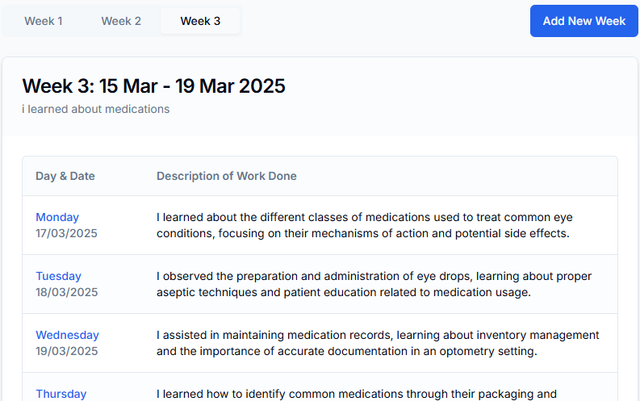
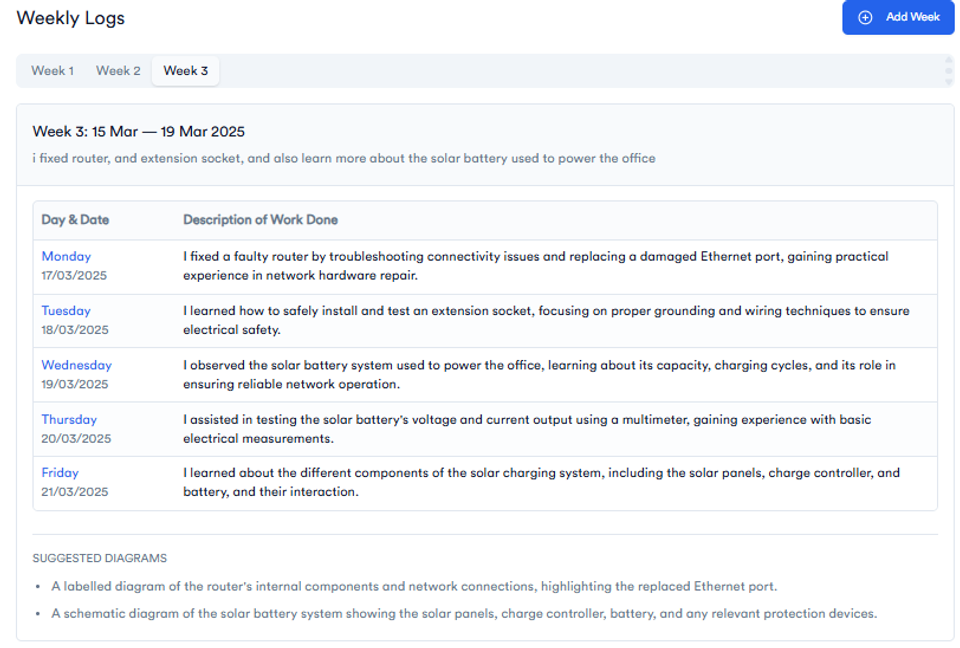
Once generated, your weekly page will look like this:
| Day | Date | Description of Work Done |
|---|---|---|
| Monday | 2025-11-03 | Introduced to HR and company policies. |
| Tuesday | 2025-11-04 | Met the software development team. |
| Wednesday | 2025-11-035 | Learned about team tools and structure. |
| Thursday | 2025-11-06 | Assisted with documentation tasks. |
| Friday | 2025-11-07 | Tested a new app feature and wrote bug reports. |
At the bottom, you’ll also see Suggested Diagrams, such as:
- Company organizational chart
- Basic software development workflow
- Example bug report template
Step 5: Edit, Save, or Download
You can edit any log entry, add notes or sketches, and export the full week as a PDF ready for printing or submission.
You can also add new weeks as your training progresses.
💡 What Makes SIWES Logbook Different
| Feature | SIWES Logbook Generator | Traditional Paper Logbook |
|---|---|---|
| AI-Generated Logs | ✅ Yes | ❌ No |
| Cloud Backup | ✅ Yes | ❌ Lost if damaged |
| Diagram Suggestions | ✅ Yes | ❌ Manual |
| Downloadable PDF | ✅ Yes | ❌ No |
| Time Required | ⏱ Less than 1 min | ⏱ Hours per week |
| Accessibility | 🌐 Online (Anywhere) | 📝 Physical only |
Who Can Use It?
The SIWES Logbook Generator supports all major courses, including:
- Computer Science / Engineering
- Mass Communication
- Business Administration
- Science Laboratory Technology (SLT)
- Microbiology
- Accounting
- Medical Laboratory Science
- Electrical, Civil & Mechanical Engineering
Basically, any Nigerian student undergoing SIWES or Industrial Training (IT) can use it.
Pricing & Free Plan
- Free Plan: 3 weeks (3 credits) — perfect for testing.
- Premium (v2 Launch Offer): ₦700 (normally ₦900).
You can pay online and unlock full access instantly.
💡 You can also earn extra credits by referring friends directly from your dashboard.
🧠 Why Every SIWES Student Should Use This Tool
Because it solves all the common logbook problems:
- No more guessing what to write daily.
- No last-minute rush before submission.
- Professional-looking entries that improve your grade.
- Works for every department and institution.
If you want to spend more time learning at your placement and less time stressing about your logbook — this tool is for you.
Try It Now (Free)
👉 Visit SIWES Logbook Generator by MonoEd
Start with 3 free credits and generate your first weekly log in seconds!
Wrap Up
The SIWES Logbook Generator by MonoEd Africa is the first and best digital solution made for Nigerian students doing SIWES or IT. It’s fast, smart, and affordable — a real game-changer for logbook documentation.
Whether you’re a Computer Science, Engineering, or SLT student, this tool will help you fill your logbook effortlessly, improve your grade, and save hours of manual writing.
✨ No more last-minute rush. Just click, generate, and print.
Perfect idea — an FAQ section will boost both SEO and user trust!
Here’s a structured FAQ section for your post, using proper heading levels:
FAQs
What is the SIWES Logbook Generator?
The SIWES Logbook Generator is an online tool by MonoEd that helps Nigerian students automatically generate weekly SIWES or IT logbook entries. It uses AI to create professional daily logs, saving you time and effort.
Is the SIWES Logbook Generator free to use?
Yes! When you sign up, you’ll receive 3 free credits, which let you generate up to 3 weeks of log entries for free. After that, you can upgrade to SIWES Logbook v2 for full access and unlimited weeks.
How many weeks can I generate with the free credits?
Each week of logs uses 1 credit. So, with 3 free credits, you can generate log entries for 3 full weeks (Monday to Friday).
Can I edit my generated log entries?
Absolutely. After generating your weekly logs, you can edit each day’s entry, add extra details, or adjust them to better match your actual experience.
Does the SIWES Logbook Generator include diagrams?
Yes. The tool provides suggested diagrams for each week’s activities, helping you visualize your work with flowcharts, organizational charts, and process diagrams.
What formats can I download my SIWES logbook in?
You can easily download your completed logbook as a PDF, neatly formatted and ready to print or submit to your supervisor.
Is my data safe on the SIWES Logbook platform?
Yes, your data is stored securely. Unlike older versions that used local storage, SIWES Logbook v2 saves everything safely in the cloud so you can access it anytime.
How do I get started?
Visit monoed.africa/siwes-logbook, sign up for free, enter your details (course, company, and training period), and start generating your first week’s log instantly.
About the Author
Mohammad-Jamiu B. Balogun, GMNSE
AI Security Researcher · Founder, MonoEd Africa
Mohammad-Jamiu is a First-Class Telecommunications Engineer and Best Graduating Student (BUK), and an AI security researcher. He founded MonoEd Africa to give Nigerian students AI-powered academic tools — from SIWES logbooks to final year projects. His work has reached over 10,000 students across Nigeria.