How to Convert Your Thesis Into a Journal Article Using PaperDraft (Step by Step)
Learn how to convert your thesis into a journal article using PaperDraft. Follow this step by step guide to condense your research, select real references, generate a structured manuscript, and prepare it for publication.

Quick Summary
Converting a thesis into a journal article is not about copying chapters into a shorter document. A journal article focuses on one research contribution, follows a concise structure, and meets the expectations of academic journals.
PaperDraft simplifies this process by helping you select real references, add your own methods and results, generate a structured manuscript, switch citation styles instantly, and export your paper in multiple formats. Instead of starting from a blank page, you work through a guided workflow designed specifically for academic publishing.
Why You Cannot Simply Submit Your Thesis
Many students finish their undergraduate project, master's thesis, or PhD dissertation and assume they can upload the same document to a journal.
Unfortunately, that is not how academic publishing works.
A thesis is written to demonstrate everything you learned throughout your research. It includes detailed explanations, lengthy literature reviews, extensive methodology, appendices, and university formatting requirements.
A journal article has a different purpose.
Editors and reviewers want a focused paper that communicates one important contribution clearly and efficiently.
That means you need to:
- Reduce unnecessary background
- Focus on one main finding
- Rewrite sections for publication
- Follow journal formatting requirements
- Use accurate citations throughout
Doing all of this manually can take weeks.
PaperDraft helps reduce much of the repetitive work while keeping your own research at the center of the writing process.
What Makes PaperDraft Different?
Unlike general AI chat tools, PaperDraft is built around how researchers actually write papers.
Instead of asking an AI to "write my paper," you move through a structured workflow.
You:
- Define your research topic
- Find and select real academic papers
- Add your own research data
- Generate a content plan
- Write properly structured sections
- Export your completed manuscript
Most importantly, your citations come from papers you selected, not references generated by guesswork.
Step 1: Create Your Manuscript
Start by creating a new manuscript inside PaperDraft.
Enter:
- Your research topic
- Paper type
- Academic discipline
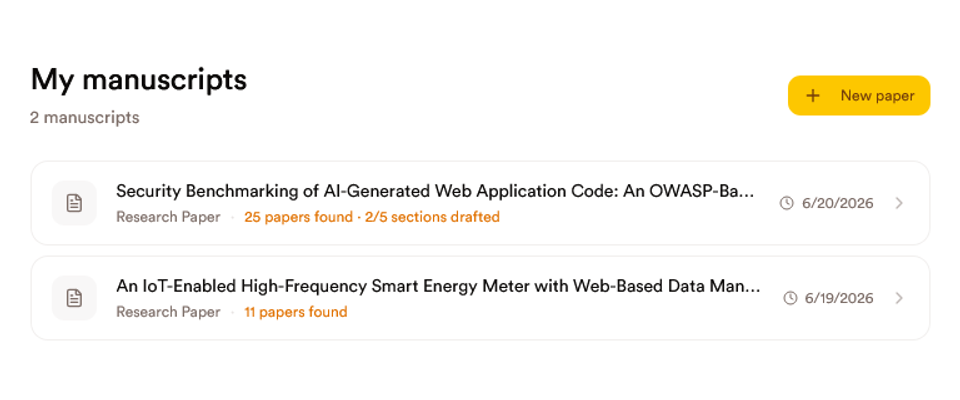
PaperDraft automatically prepares an appropriate manuscript structure.
For example, a computer science paper will have different section headings from a medical or social science paper.
This saves time and ensures your manuscript follows conventions used in your field.
Step 2: Find and Select Real References
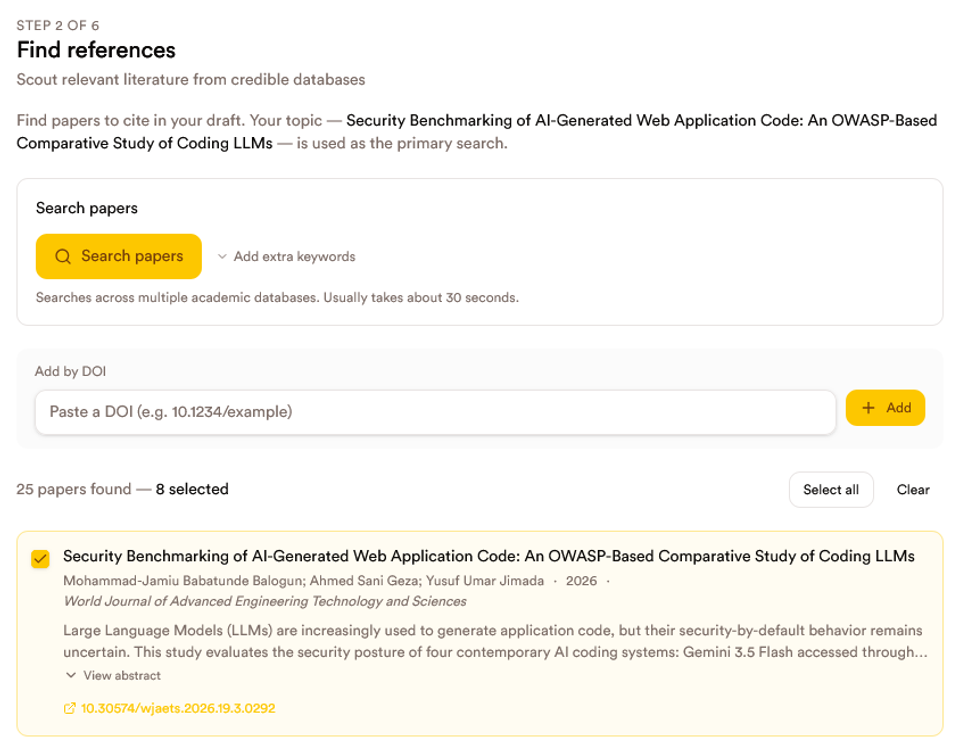
The next step is choosing the papers that will support your research.
Instead of manually copying references between different websites and documents, PaperDraft lets you search academic databases and build your reference list inside the same workflow.
Select only the studies that are directly relevant to your research.
Every citation generated later will come from this reference list.
This means you stay in control of your sources while avoiding one of the biggest problems with general AI tools: invented references.
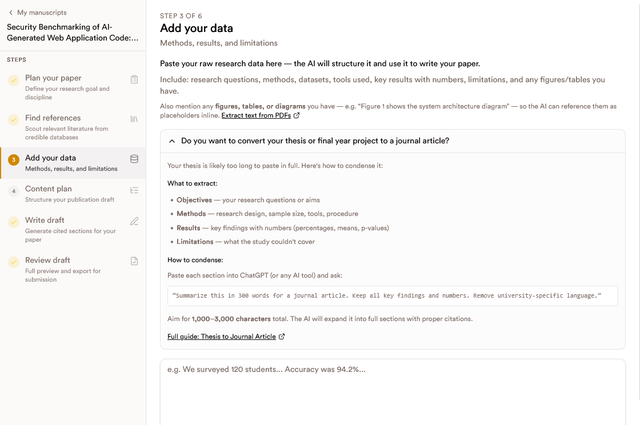
Step 3: Extract the Important Parts of Your Thesis
This is the step where many researchers get stuck.
A thesis can easily exceed 30,000 words.
A journal article usually cannot.
You do not need to paste your entire thesis into PaperDraft.
Instead, extract the information that matters most.
Include:
- Research objectives or questions
- Methods
- Data collection process
- Key findings with actual numbers
- Limitations
- Important tables or figures
Aim for roughly 1,000 to 3,000 characters.
This gives PaperDraft enough context to build a well structured manuscript without overwhelming the AI with unnecessary information.
Need to shorten your thesis first?
If your thesis is too long, you can paste one chapter at a time into ChatGPT or another AI assistant and use a prompt like this:
Summarize this section for a journal article. Keep all important findings, numbers, and methodology. Remove university specific language and unnecessary background.
Repeat this for your objectives, methods, results, and limitations.
Then combine those summaries before adding them to PaperDraft.
This keeps your important research intact while reducing thousands of words into a concise summary suitable for journal writing.
Step 4: Generate a Content Plan
Before generating any sections, create a content plan.
Many researchers skip this step and immediately start writing.
That often produces papers that feel disconnected.
PaperDraft creates an outline that organizes your ideas into a logical structure before drafting begins.
This gives you an opportunity to review the flow of your paper and make changes before generating the manuscript.
Planning first usually leads to stronger papers and fewer revisions later.
Step 5: Generate Your Journal Article
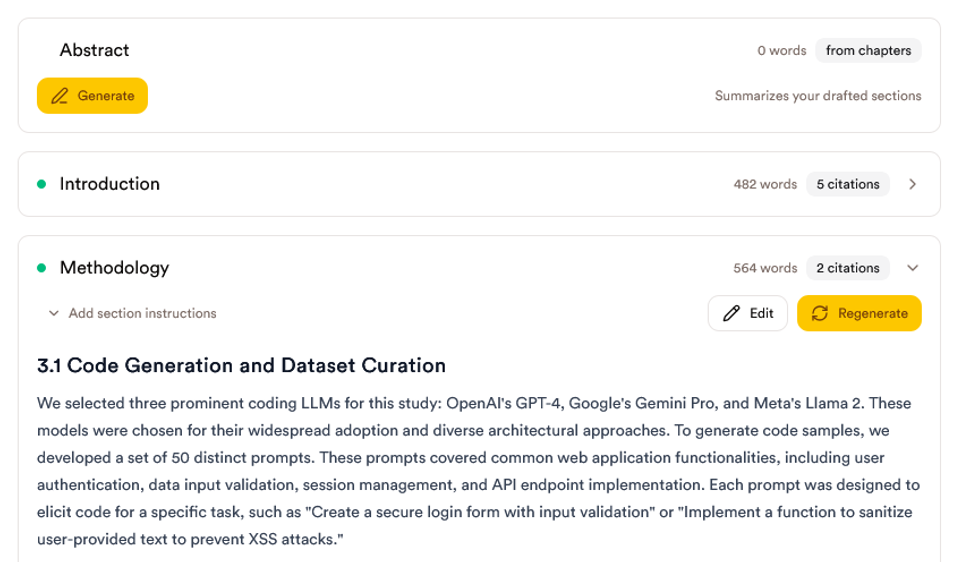
Once your references and research data are ready, PaperDraft begins generating your manuscript.
You can generate:
- Individual sections
- Multiple sections
- Your entire draft
- An abstract after drafting
Each section is built using:
- Your selected references
- Your own research information
- The content plan you approved
The generated text is fully editable, so you can improve wording, regenerate sections, or make changes before submission.
Step 6: Choose Your Citation Style
Different journals require different citation formats.
Instead of manually editing hundreds of references, simply switch between supported styles.
PaperDraft currently supports:
- APA
- IEEE
- Harvard
- Chicago
- MLA
- Vancouver
Both in text citations and the reference list update automatically.
This can save hours of formatting work.
Step 7: Export Your Manuscript
Once you're happy with your paper, export it in the format you need.
Supported exports include:
- Microsoft Word (.docx)
- Markdown (.md)
- LaTeX (.tex)
- BibTeX (.bib)
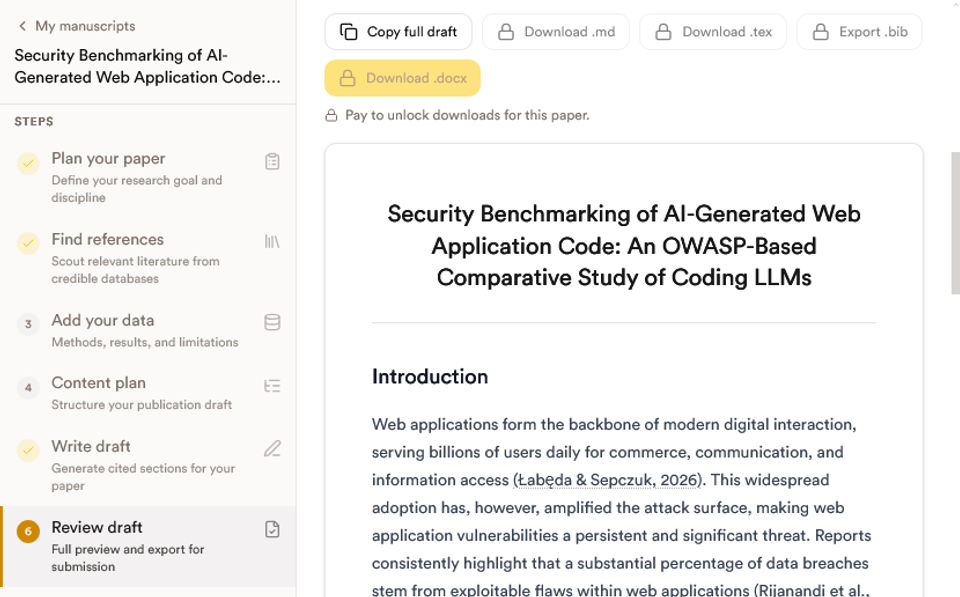
Whether you're submitting to a journal, sharing with a supervisor, or continuing your work elsewhere, your manuscript is ready.
Common Mistakes When Converting a Thesis
Many first time authors slow themselves down by making avoidable mistakes.
Some of the most common include:
- Copying entire thesis chapters without rewriting them
- Including every result instead of focusing on the strongest findings
- Writing an excessively long literature review
- Using references they have not verified
- Spending hours manually formatting citations
- Trying to write everything before creating an outline
A structured workflow helps avoid these problems.
Can PaperDraft Write Your Entire Paper?
PaperDraft is designed to assist researchers, not replace them.
Your ideas, methods, data, analysis, and conclusions should always come from your own research.
The platform helps organize that information into a properly structured manuscript while connecting your writing to references you selected.
This makes writing faster without removing academic responsibility.
Why Researchers Use PaperDraft Instead of Starting From Scratch
Writing a journal article involves much more than generating paragraphs.
Researchers often spend hours switching between academic databases, citation managers, word processors, and AI chat tools.
PaperDraft brings these tasks together in one workflow.
Instead of juggling multiple applications, you can:
- Find relevant literature
- Build your reference list
- Add your research data
- Plan your manuscript
- Generate sections
- Switch citation styles
- Export your paper
This allows you to spend more time improving your research and less time managing documents.
Conclusion
Publishing your research should not require starting over from a blank page.
If you already have a thesis, final year project, dissertation, or completed research, much of the hard work has already been done.
The challenge is transforming that work into a concise manuscript that journals want to publish.
PaperDraft helps streamline that journey by combining real references, your own research data, structured planning, manuscript generation, citation management, and exports in one place.
Instead of wrestling with formatting, copying citations between tools, or trying to condense thousands of words manually, you can focus on presenting your research clearly and professionally.
If you're ready to turn your thesis into a publication, start your first manuscript with PaperDraft and see how much faster the process becomes.
💡 Continue reading:
- How to Write a Literature Review: A Step by Step Guide for Research Papers, Proposals, and Dissertations
- How to Write a Research Paper Fast (Without Sacrificing Quality)
- How to Write a Research Paper in One Day
- How to Publish Your Research for Free
- Why ChatGPT Invents Citations (And How to Avoid Fake References)
FAQs
Can PaperDraft convert my thesis into a journal article?
Yes. PaperDraft is designed to help researchers transform theses, dissertations, and final year projects into structured journal manuscripts. Instead of uploading your full thesis, you provide the key research information and generate sections based on your own work.
Do I need to paste my entire thesis?
No. Most theses are far longer than a journal article. Extract your objectives, methods, results, limitations, and important figures or tables. A concise summary usually provides enough information for drafting.
Will PaperDraft invent my results?
No. PaperDraft uses the methods and findings you provide. You should include your actual results, numbers, and limitations so the generated manuscript accurately reflects your research.
Where do the citations come from?
Your citations are based on the academic papers you selected during the reference search stage. This gives you control over the sources used throughout your manuscript.
Can I edit the generated sections?
Yes. Every section can be edited, regenerated, or refined before you export your manuscript.
Which citation styles are supported?
PaperDraft supports APA, IEEE, Harvard, Chicago, MLA, and Vancouver citation styles. You can switch between them without manually reformatting your references.
Can I export my paper?
Yes. You can export your manuscript as a Word document, Markdown file, LaTeX file, or BibTeX file for submission or further editing.
Is PaperDraft suitable for undergraduate projects?
Yes. Undergraduate students, master's students, PhD researchers, scholarship applicants, and early career researchers can all use PaperDraft to organize and draft academic manuscripts more efficiently.
About the Author
Mohammad-Jamiu B. Balogun, GMNSE
AI Security Researcher · Founder, MonoEd Africa
Mohammad-Jamiu is a First-Class Telecommunications Engineer and Best Graduating Student (BUK), and an AI security researcher. He founded MonoEd Africa to give Nigerian students AI-powered academic tools — from SIWES logbooks to final year projects. His work has reached over 10,000 students across Nigeria.