SIWES ITF Form 8: How to Fill It Correctly (Official Step by Step Guide)
Learn how to fill SIWES ITF Form 8 correctly using the official fields. Detailed student guide covering Part A, B, and C, examples, common mistakes, and FAQs.


The SIWES ITF Form 8, officially titled the End of Programme Report Sheet, is a compulsory document for all students participating in the Student Industrial Work Experience Scheme in Nigeria. Every university, polytechnic, and college of education student must complete this form correctly for their SIWES to be approved by their institution and the Industrial Training Fund.
Filling this form incorrectly can lead to rejection, delayed approval, or loss of SIWES marks. This guide explains how to fill the SIWES ITF Form 8 correctly using the exact sections on the official form, with clear explanations and practical examples students can easily follow.
💡 Quick Summary
- SIWES ITF Form 8 is mandatory for SIWES approval
- Part A is filled by the student
- Part B is filled by the employer
- Part C is filled by the institution
- Missing stamps or signatures can lead to rejection
⚡ SIWES Tools for Students 🔥
Use our free AI-powered tools to make SIWES easier.
SIWES Report Generator — Generate a formatted SIWES report instantly.
https://report.monoed.africa
SIWES Logbook Generator — Create weekly logbook entries in seconds.
https://logbook.monoed.africa
SIWES / IT Placement Finder — Find verified SIWES & IT placement opportunities.
https://siwesfinder.monoed.africa
What Is SIWES ITF Form 8?
ITF Form 8 is a two page (or double-sided) document issued under the Industrial Training Fund for students completing SIWES. It summarizes the student’s training experience and captures assessments from the employer and the institution.
The form serves to:
- Confirm the student’s industrial attachment
- Describe the training provided
- Assess the student’s performance
- Validate SIWES completion for academic records
A properly completed Form 8 is mandatory for SIWES approval.
Who Completes SIWES ITF Form 8?
Three parties are involved:
- The student completes Part A
- The employer or industry supervisor completes Part B
- The institution or SIWES supervisor completes Part C
Each section must be completed by the correct party.
Structure of the SIWES ITF Form 8
The form is divided into three main parts:
- Part A: Student information and training summary
- Part B: Employer confirmation and assessment
- Part C: Institution assessment and grading
Understanding this structure helps prevent errors.
Step by Step Guide on How to Fill SIWES ITF Form 8
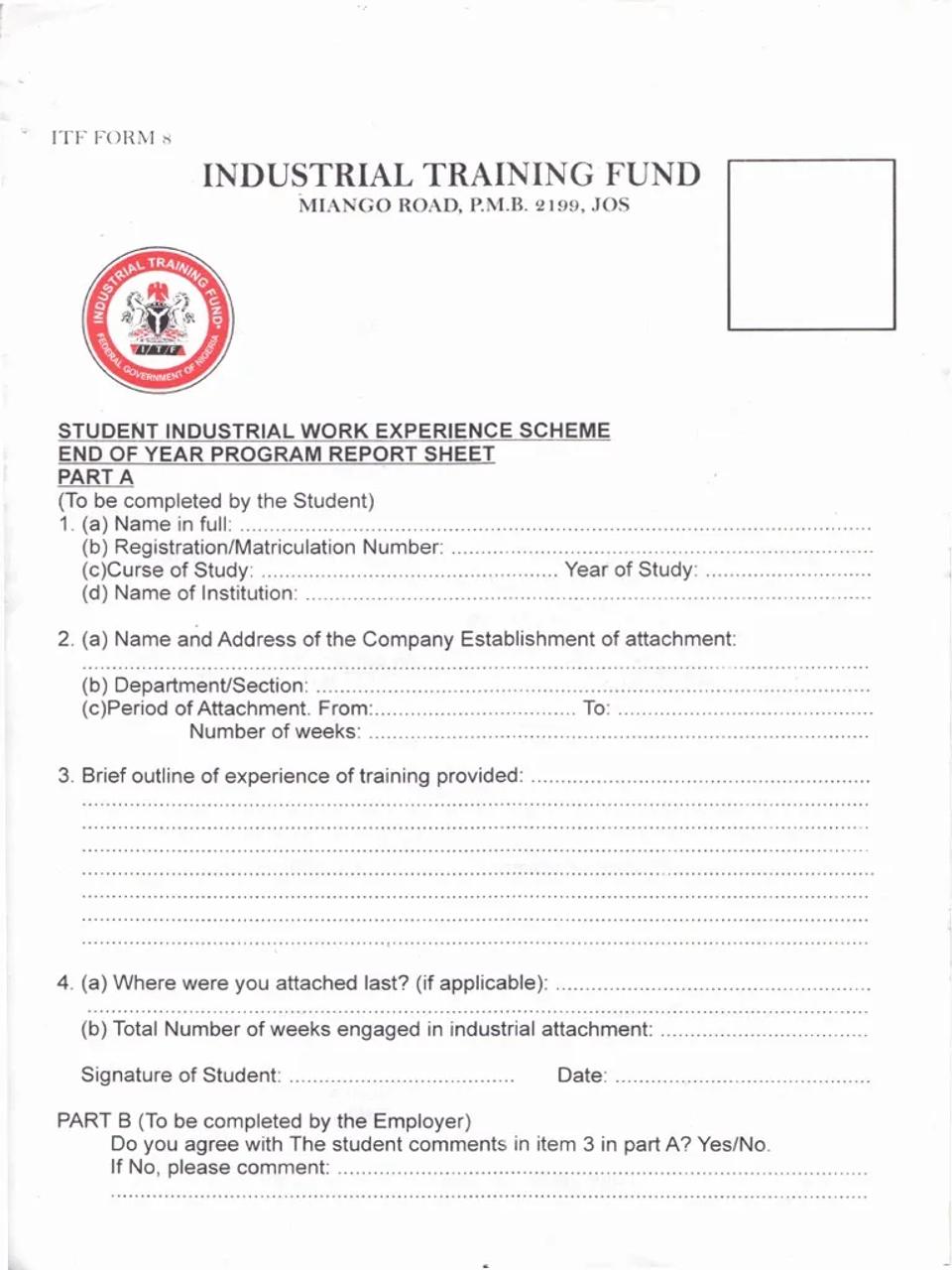
PART A: To Be Completed by the Student
This section must be filled neatly and accurately by the student.
Section 1: Student and Institution Details
Fields on the form:
- Name in full
- Registration or Matriculation Number
- Course of Study and Year of Study
- Name of Institution
How to fill it:
- Write your full name exactly as it appears on school records
- Use your correct matriculation or registration number
- State your course and current year or level
- Write the full official name of your institution
Example:
Name in full: Balogun Mohammad Jamiu Babatunde
Matriculation Number: TELE/18/0123
Course of Study: Telecommunication Engineering, Year 4
Institution: Federal University of Technology, Minna
Section 2: Company or Establishment of Attachment
Fields on the form:
- Name and Address of the Company or Establishment of Attachment
- Department or Section
- Period of Attachment From ____ To ____
- Total Number of Weeks
How to fill it:
- Write the full registered name of the organization
- Include the complete address
- Specify the department where you worked
- Use accurate start and end dates
- Calculate the duration correctly
Example:
Company Name: XYZ Technologies Limited
Address: No. 15 Obafemi Awolowo Way, Ikeja, Lagos
Department: Information Technology Support Unit
Period: From 5th May 2025 To 25th October 2025
Total Number of Weeks: 24 weeks
Section 3: Brief Outline of Experience of Training Provided
This is one of the most important sections in Part A.
What ITF expects:
A clear and honest summary of the training you received.
Avoid vague statements such as:
- I assisted my supervisor
- I learned many things
Good example:
During my industrial training, I assisted in computer system installation, operating system configuration, basic network troubleshooting, printer maintenance, and documentation of daily technical activities. These tasks improved my practical understanding of information technology systems and workplace operations.
Key tips:
- Be specific
- Use simple technical language
- Relate activities to your course
Section 4: Previous Attachment and Duration Confirmation
Fields on the form:
- Where were you attached last? if applicable
- Total Number of weeks engaged in industrial attachment
- Signature of Student
- Date
How to Fill Section 4 Correctly
(a) Where were you attached last?
This refers to your previous industrial training or SIWES placement, not your current one.
- If this is your first SIWES, write Not Applicable
- If you have done SIWES or industrial attachment before, write the name of the organization
Examples:
- Not Applicable
- ABC Manufacturing Company, Aba
(b) Total Number of Weeks Engaged in Industrial Attachment
Write the total duration of your current SIWES, exactly as calculated earlier.
Example:
Total Number of Weeks: 24 weeks
Student Signature and Date
- Sign in the space provided
- Write the correct date
Part A is incomplete without your signature.
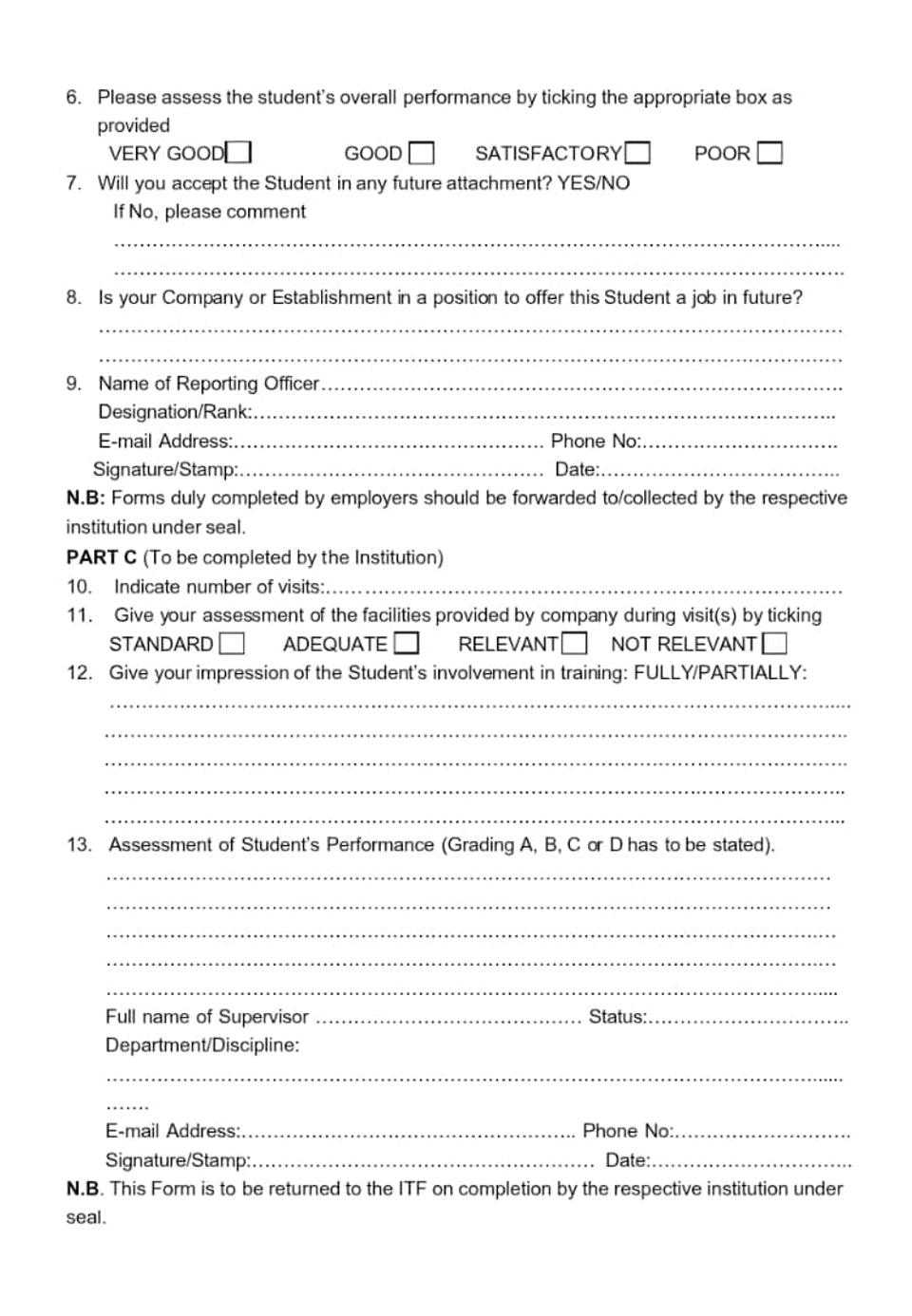
PART B: To Be Completed by the Employer
This section must be completed by your industry supervisor or an authorized officer, not the student.
Employer Confirmation of Training Summary
Official question on the form:
Do you agree with the student's comments in item 3 in page A? Yes or No. If No, please comment.
The employer ticks Yes or No and adds comments if necessary.
Employer Assessment of Student Performance
Assessment options on the form:
- Very Good
- Good
- Satisfactory
- Fair
The employer selects the option that best reflects your performance.
Future Employment and Training Capacity
The employer answers:
- Will you accept the student for future pre graduate or post graduate employment?
- Is your company or establishment able to offer training spaces next year?
These responses help ITF assess industry participation.
Officer in Charge of Firm
The employer must provide:
- Name in block letters
- Email address or phone number
- Signature
- Official stamp
- Date
Forms without stamps are commonly rejected.
PART C: To Be Completed by the Institution
After Part B is completed, the form is submitted to the institution.
Section 8: Institution or Provider of Visits
The institution confirms supervision of the student during SIWES.
Section 9: Employer Participation Assessment
Options on the form:
- Standard
- Adequate
- Relevant
- Not Relevant
The institution assesses the quality of training provided.
Section 10: Personal Assessment of Student Involvement
The SIWES supervisor comments on the student’s commitment, participation, and understanding during the final report or defense.
Section 11: Assessment of Student Performance
The student is graded using:
- A
- B
- C
- D
Based on the institution’s grading index.
Supervisor Details
The supervisor must include:
- Full name in block letters
- Email address or phone number
- Signature
- Official stamp
- Date
Correct SIWES ITF Form 8 Submission Process
- Student completes Part A and maintains logbook
- Employer completes Part B and stamps the form
- Student submits documents to the institution
- Institution completes Part C and stamps
- Student submits endorsed Form 8 to ITF
Submission to the ITF office is usually coordinated through the institution, except where students are instructed otherwise.
Common Mistakes That Lead to Rejection
- Missing signatures or stamps
- Inconsistent dates
- Poor or vague training summary
- Illegible handwriting
- Submitting without institutional endorsement
Sample Training Summary by Course
Engineering Student:
I participated in equipment maintenance, assisted in electrical installations, carried out fault diagnosis, and prepared technical reports under supervision.
Computer Science Student:
I assisted in software installation, basic network troubleshooting, database backups, and user support tasks.
⚡ SIWES Tools for Students 🔥
Use our free AI-powered tools to make SIWES easier.
SIWES Report Generator — Generate a formatted SIWES report instantly.
https://report.monoed.africa
SIWES Logbook Generator — Create weekly logbook entries in seconds.
https://logbook.monoed.africa
SIWES / IT Placement Finder — Find verified SIWES & IT placement opportunities.
https://siwesfinder.monoed.africa
📙 Final Year Project Tools 🔥
FYP Report Generator — Generate full project chapters and citations.
https://fyp.monoed.africa
Project Topic Generator — Get supervisor-ready project topics instantly.
https://topics.monoed.africa
Final Notes for Students
The SIWES ITF Form 8 is not just a form. It is a formal record of your industrial training. Taking time to fill it correctly improves your chances of smooth approval and full SIWES credit.
Always treat the form with care, follow instructions, and submit on time.
FAQs on SIWES ITF Form 8
What is SIWES ITF Form 8 used for?
It is used to officially document and validate a student’s industrial training experience.
Who fills Part A of ITF Form 8?
The student fills Part A.
Who fills Part B of ITF Form 8?
The employer or industry supervisor fills Part B.
Who fills Part C of ITF Form 8?
The institution SIWES supervisor fills Part C.
Can I submit SIWES Form 8 without a stamp?
No. Forms without official stamps are usually rejected.
Where can I get SIWES ITF Form 8?
It is issued by your school SIWES unit or made available through ITF channels.
About the Author
Mohammad-Jamiu B. Balogun, GMNSE
AI Security Researcher · Founder, MonoEd Africa
Mohammad-Jamiu is a First-Class Telecommunications Engineer and Best Graduating Student (BUK), and an AI security researcher. He founded MonoEd Africa to give Nigerian students AI-powered academic tools — from SIWES logbooks to final year projects. His work has reached over 10,000 students across Nigeria.