SIWES Logbook Template (Free Word + PDF Download) — Filled Sample 2026
Download a free SIWES logbook template for Nigerian students. Includes a 12-week filled sample (Word + PDF) and a blank weekly format. No login required.

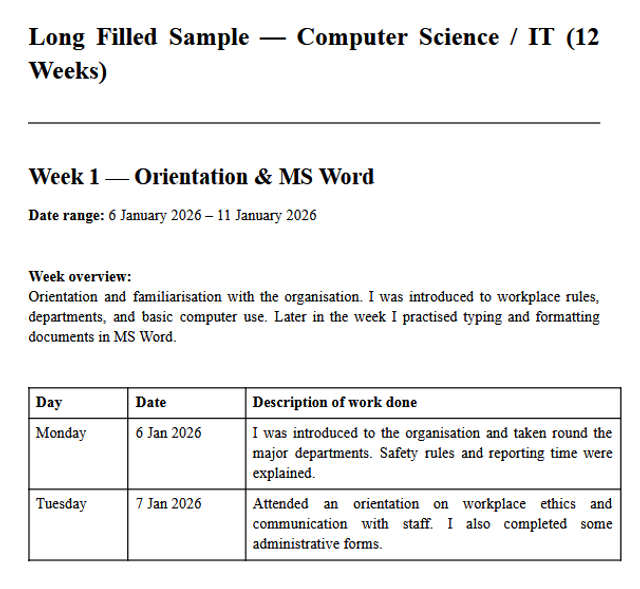
If you are searching for a SIWES logbook template you can actually use, this page is for you. Most students do not want an empty table, they want a filled sample that shows exactly what to write, so they can adapt it to their own industrial training.
Below is a free download pack that includes:
- A 12-week filled sample for Computer Science / IT students (Monday–Friday entries)
- A blank weekly template if your school already issued an empty logbook and you only need the format
No Scribd login. No paywall. Just download, adapt, and submit.
Free Download — SIWES Logbook Template
| File | Description | Download |
|---|---|---|
| Filled Sample (Word) | 12 weeks, CS/IT, Monday–Friday entries | Download Word |
| Filled Sample (PDF) | Same content, print-ready PDF | Download PDF |
| Blank Template (Word) | Empty weekly tables for any course | Download Word |
| Blank Template (PDF) | Print-friendly blank format | Download PDF |
Tip: The filled sample is what most students need. Copy the entries, change the company name and tasks to match what you actually did, and have your supervisor sign each week.
What Is Inside the Filled Sample?
The filled template covers 12 weeks of typical IT department activities. Here is the full breakdown:
| Week | Focus Area |
|---|---|
| Week 1 | Orientation & MS Word |
| Week 2 | Excel & Data Management |
| Week 3 | HTML Basics |
| Week 4 | CSS Styling |
| Week 5 | Printing & Documentation |
| Week 6 | Hardware Maintenance |
| Week 7 | Networking Basics |
| Week 8 | Database Fundamentals |
| Week 9 | JavaScript Introduction |
| Week 10 | Software Installation |
| Week 11 | Office IT Support |
| Week 12 | Final Project & Documentation |
Each week contains five daily entries (Monday to Friday) written in a professional tone suitable for any Nigerian polytechnic or university SIWES program.
Preview: Week 1 – Orientation & MS Word
| Day | Activity |
|---|---|
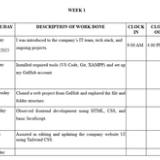
| Monday | Introduced to the IT department, company policies, and team members. Attended an orientation session on workplace safety and data privacy rules. |
| Tuesday | Learned workstation setup, company software installation, and file organization protocols. Created a personal folder structure on the shared drive. |
| Wednesday | Typed official letters, formatted documents, and learned to create templates in MS Word. Practiced using styles, headers, and page numbering. |
| Thursday | Assisted in proofreading documents and formatting reports for other departments. Corrected alignment and spacing issues in a 20-page report. |
| Friday | Compiled weekly tasks, reflected on skills learned, and submitted logbook entries to supervisor for review and signature. |
Preview: Week 2 – Excel & Data Management
| Day | Activity |
|---|---|
| Monday | Learned spreadsheet basics, opened company Excel files, and explored data structure. Identified columns, rows, and data types used in sales records. |
| Tuesday | Applied formulas (SUM, AVERAGE, COUNT), created tables, and used conditional formatting to highlight overdue entries. |
| Wednesday | Sorted data alphabetically and numerically, used pivot tables to summarize sales by region, and prepared charts for a weekly presentation. |
| Thursday | Assisted in reconciling data and preparing weekly summary reports for management. Cross-checked figures for accuracy. |
| Friday | Documented weekly activities in the logbook, focusing on Excel skills acquired, and obtained supervisor’s signature. |
How to Use This Template (The Right Way)
- Change the company name — Replace every mention of "the company" with your actual IT placement organization.
- Adapt the tasks — If you did not touch Excel in Week 2, swap it for what you actually did (e.g., data entry, web research, graphic design).
- Add real details — Include software versions, equipment models, or colleague names where relevant. Specificity makes entries believable.
- Reflect honestly — Keep the reflection paragraph but rewrite it based on your real challenges and learning outcomes.
- Get signed weekly — Do not fill everything at once. Have your supervisor sign at the end of each week.
👉 Need the full breakdown of all 12 weeks? See our detailed guide: Filled SIWES Logbook for Computer Science Students (12 Weeks Sample)
How to Write SIWES Logbook Entries (Phrase Bank)
If you prefer to write your own entries from scratch, use these sentence starters:
| Situation | Sentence Starter |
|---|---|
| First day / Orientation | "I was introduced to the department and briefed on company policies regarding…" |
| Learning new software | "I learned how to use [software name] to [specific task], including features such as…" |
| Assisting a colleague | "I assisted the [job title] in [task], which involved…" |
| Troubleshooting | "I identified an issue with [problem] and resolved it by [solution]…" |
| Daily reflection | "Today I improved my understanding of [topic]. The main challenge was…" |
| Weekly summary | "This week focused on [theme]. I developed skills in [skill] and plan to…" |
Rule of thumb: One paragraph per day. Start with what you did, mention the tool or method, and end with what you learned.
Blank Weekly Format (For Schools That Issued Empty Logbooks)
If your school gave you a plain logbook and you only need a clean weekly layout, use the blank template. It contains:
- Student and company information page
- Weekly activity table (Monday–Saturday columns)
- Supervisor comment and signature line
- Total hours worked summary
Simply print or copy the format into your school-issued book.
FAQs
Is this SIWES logbook template free?
Yes. All four files are free to download. No email required, no subscription.
Can I use this for courses other than Computer Science?
Yes. The blank template works for any course. If you are in Engineering, Accounting, or Mass Communication, use the filled CS sample as a writing guide, but replace the technical tasks with ones relevant to your field.
What is the difference between a SIWES logbook and a SIWES report?
The logbook is a weekly diary of daily activities signed by your supervisor. The report is a final document (usually 20–40 pages) submitted to your school at the end of IT, summarizing everything you learned. This page provides the logbook template; you can generate your report separately.
Is there a PDF version?
Yes. Both the filled sample and the blank template are available as PDF downloads above.
Is there an Excel version?
Not yet, but the Word tables can be copied into Excel if your school requires a spreadsheet format.
Can I submit the filled sample exactly as it is?
No. You must adapt it. Supervisors and lecturers can tell when entries are generic. Use it as a strong starting point, not a final submission.
How many weeks should a SIWES logbook cover?
Most Nigerian universities and polytechnics require 12 weeks for SIWES (Student Industrial Work Experience Scheme). Some departments extend this to 16 or 24 weeks. The filled sample covers 12 weeks; duplicate or extend weeks as needed.
Want Custom Entries for Your Specific Company?
If you do not want to rewrite entries manually, you can generate them instantly.
Our SIWES Logbook Generator turns a short summary of your week into complete, well-written Monday-to-Friday entries. Just describe what you did, and it handles the professional tone and formatting.
👉 Generate My SIWES Logbook Entries
Final Checklist Before Submission
- Company name replaced throughout
- Dates match your actual IT period
- Supervisor signed at the end of each week
- Handwriting is legible (if handwritten)
- Pages are numbered
- No blank weeks left unexplained
- Reflections sound personal, not copied
About the Author
Mohammad-Jamiu B. Balogun, GMNSE
AI Security Researcher · Founder, MonoEd Africa
Mohammad-Jamiu is a First-Class Telecommunications Engineer and Best Graduating Student (BUK), and an AI security researcher. He founded MonoEd Africa to give Nigerian students AI-powered academic tools — from SIWES logbooks to final year projects. His work has reached over 10,000 students across Nigeria.